Showing posts with label Drupal Quick Tips. Show all posts

May 22, 2014

Fix Bootstrap theme error on Drupal using [Jquery update + Libraries ]


 hola chicos ;)


I recently installed Bootstrap theme on my site and enabled it to be my default theme, I noticed my firebug printing errors on my console and all js related features are disabled after the page reload,  which I started to suspect on my jquery file version and eventually I confirmed that version of my file is the culprit.

Drupal 7.x installation comes with the jquery version 1.4.x but as per date 05/2014 it is version 1.11.x so obviously you know why you get that error! I have listed few steps below to get rid of those junks!

Step 1
Install jQuery Update module and configure (admin/config/development/jquery_update) the version you need to make use of.
Note: selecting from cdn i.e(jquery, google) will fix the error for sure, if not follow the other steps down.

Step 2
Install Libraries API module and enable it , Install Bootstrap Libraries module and enable it

Step 3
Now download the latest version of bootstrap files from http://getbootstrap.com/ and extract the files in sites/all/libraries directory by renaming the folder “bootstrap”

Step 4
Make any configurations you need in the page /admin/config/development/bootstrap_library and hit save

The steps above will override all the old/existing jquery version and will be compatible with your bootstrap files.

Step 5
Post any questions or comments and Follow me on twitter @ashkar_rahman.

Apr 30, 2014

Drupal Quick Tip : Using Exposed filter in Block Display

This is related to my previous post about exposed filters and data export.
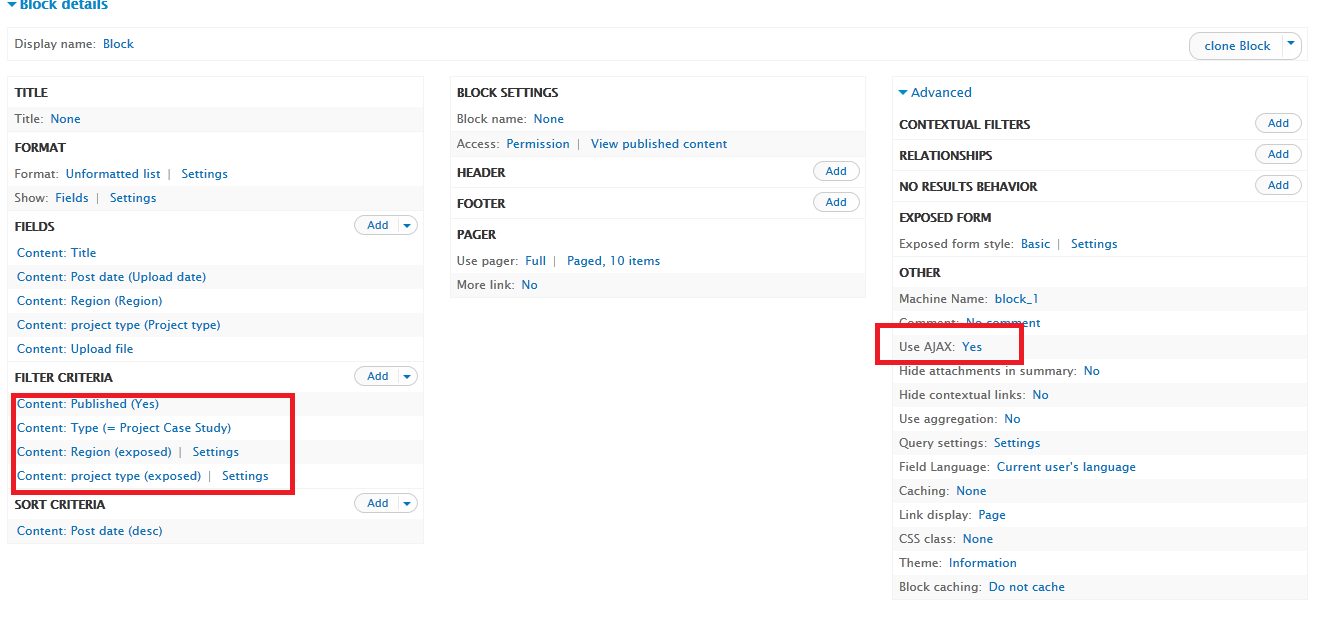
Making an exposed filter to display on a view page display is very simple, and making it to show in a view block  display just needs one option to be enabled.
if you’re unknown of it, you guys are going to spend hours finding it. hope this post will save you a lot of time…!

IN JUST ONE STEP!!!
If you’re in your block display and struggling to get your exposed filter simply set Use Ajax to ‘Yes’ on advanced options panel,  in default it is set to ‘No’ Check the screenshot below


Untitled.png

Jul 10, 2013

Drupal Quick Tip: Issues using CkEditor and Wysiwyg with Drupal 7 (rendering Media (Vimeo,Youtube), version detection)


I am writing to all those who are frustrated just as me with the latest CkEditor version where it doesn't work as expected as the old versions, especially using Wysiwyg.


  1. One of the most common problem the developers are facing after installing the Wysiwyg module and uploading the Ckeditor Library into the sites/all/libraries directory is, the Wysiwyg doesn't detect the version of the uploaded CkEditor when you navigate to /admin/config/content/wysiwyg  (I am talking about the version 4.0 and greater)
"The version of CKEditor could not be detected."


one of the solution (which is a bad practice) is to edit the ckeditor.js file inside the
directory sites/all/libraries/ckeditor, you will have to find the version written in the file
probably in the first line i.e (version:"4.1") and replace it with a lesser than the 4.0th
version i.e (version:"3.6")


  1. Though the ^^^ above solves the Ckeditor detecting issue, this doesn’t work well with media embedding.
My simple solution for this is completely remove the latest version of your ckeditor and
re-upload the old but steady/reliable version of it (I prefer version 3.6.6.1)

Mar 20, 2013

Drupal Quick Tip: Create a Google map with Custom markers on Drupal in just 5 steps


1. Get the Latitude and Longitude of your map
  • Go to http://www.satsig.net/maps/lat-long-finder.htm  and enter in the address. Click Go!
2. Get the API Key for your site
  • Go to https://developers.google.com/maps/signup and enter in the website URL, then generate a key (this will need to be done twice, once for the dev site and again when we knew the live URL.

3. Get the JS code for to place it in you block
  • Go to http://mapmaker.donkeymagic.co.uk/ and enter in the Latitude and Longitude [Step 1]. 
  • Give the marker a name such as "myMarker". 
  • Enter in the address into the Popup Content box.
  • Click Add marker.
  • Then click the"Share map" button
  • Select JavaScript tab and you will see code generated. Copy that code.
4. Go to your Drupal site and add new block. Paste in the code. On the 7th line, it says key= and then some numbers and letters. Replace that entire line with the key you generated.
  • Then within the function loadMap(), replace:
    •  icon0.image = "http://www.google.com/mapfiles/marker.png"; icon0.shadow = "http://www.google.com/mapfiles/shadow50.png";
    • with
      • icon0.image = "/sites/all/themes/THEMENAME/images/MARKER-NAME.png"; icon0.shadow = "/sites/all/themes/THEMENAME/images/MARKER-SHADOW-NAME.png";
5.  Set the Block to the desired region/view.  And that's it ...!

Aug 1, 2012

Drupal Quick Tip: Drupal 7 FAQs | Drupal Modules | Drupal Panels | Drupal Questions | Drupal Doubts


Common
  • What is Drupal?

  • What is module in Drupal?
Module is like an addon/plugin that you install and enable in drupal to enhance and
expand features in your site. The modules are developed by the drupal community

Drupal 7
  • How do I get the Admin menu as Drupal 6?
Install and enable the module Administration module and Disable the module “Toolbar”
which comes with the core modules in Drupal 7

  • How to enable the “PHP Code” filter when creating a content?
Go to Modules list (/admin/modules) and enable “PHP filter” module under core category

  • I cannot create a Panel Page in panels !
Enable the  “Page manager” module in the modules page

  • I want to create a content type which has my taxonomy terms as a field too !
When creating a feild in your content type make sure you select the field-type as

  • Can I create dummy contents in Drupal 7?
Yes, you can!
Install the Devel module and enable the Devel Genrate module too (which is a sub
module of it)

  • How to add conditional stylesheets in Drupal 7
Download and install the “conditional stylesheets” module from
http://drupal.org/project/conditional_styles and add the below code in your .info file as
need

  conditional-stylesheets[if IE 7][all][] = ie7.css


  • Where do I place my new custom panel layout?
It should be placed in layout folder inside your theme folder eg:
sites/all/themes/mytheme/layouts

Every week we update the article! stay tuned !